Photography Tips · · Updated · Andy Feliciotti
Instagram Image Size Guide for 2026 (Posts, Reels, Stories)
Instagram updated its grid layout in 2025, replacing the classic square thumbnails with a taller 3:4 crop. That single change affected how every photo and video displays on your profile. Combined with new Reels length limits and higher ad resolution requirements, keeping track of the correct Instagram image sizes is more important than ever.
We’ve put together this updated guide with all of the dimensions for Instagram in 2026, covering feed posts, carousels, Stories, Reels, profile pictures, and ads.
Instagram Feed Post Dimensions
After taking photos with your camera, you’ll want to crop them to one of Instagram’s supported aspect ratios before uploading. Here are the four options for feed posts:
Square: 1080 x 1080 pixels (1:1 aspect ratio)
Portrait: 1080 x 1350 pixels (4:5 aspect ratio)
Tall Portrait (New): 1080 x 1440 pixels (3:4 aspect ratio)
Landscape: 1080 x 566 pixels (1.91:1 aspect ratio)
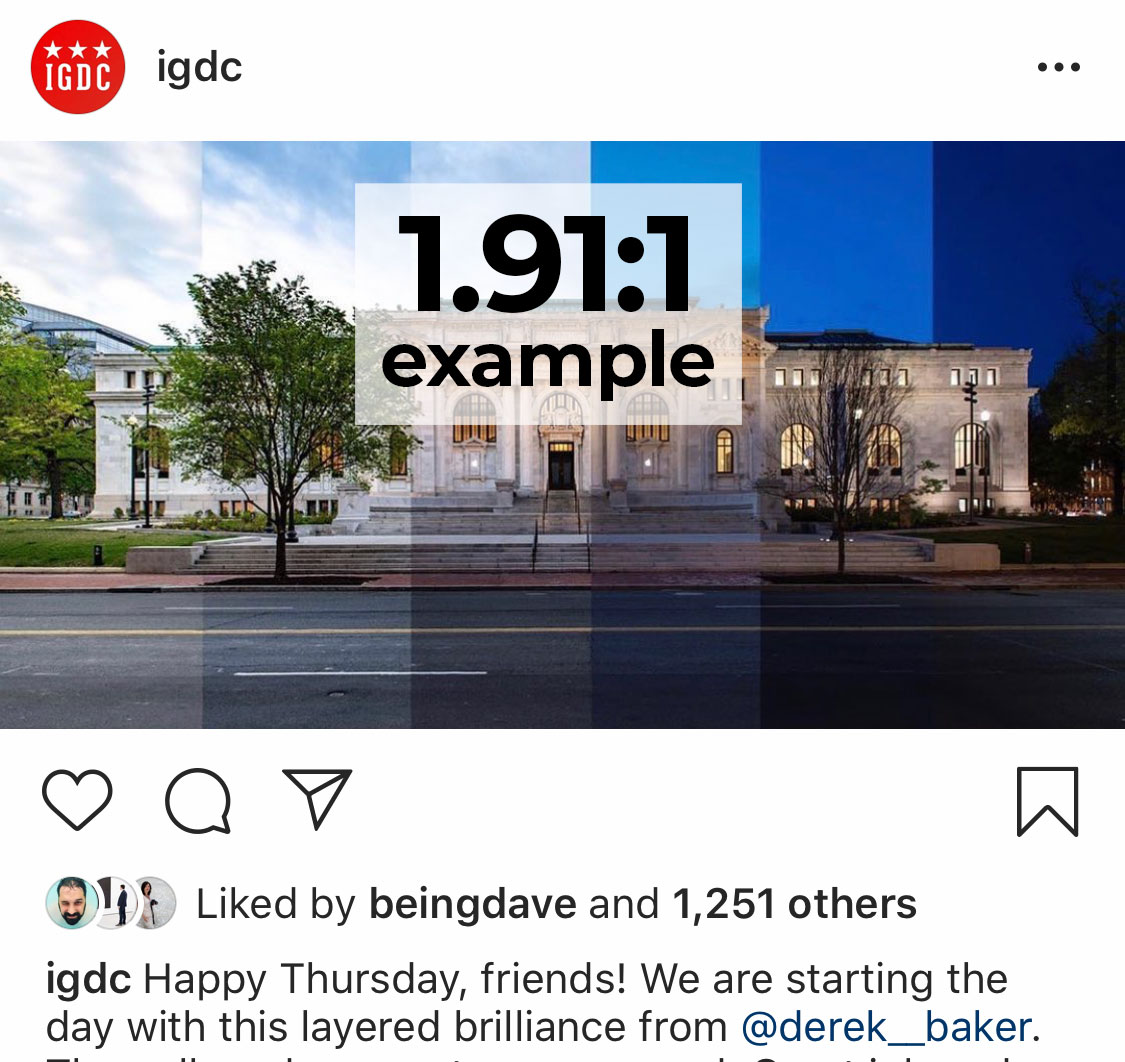
The 3:4 ratio was introduced alongside the 2025 grid update and gives your photos more vertical space in the feed. Portrait (4:5) remains the most popular choice for maximizing screen real estate, but 3:4 now matches the grid thumbnail crop exactly.

Instagram accepts uploads up to 1080 pixels wide. Anything larger gets downscaled, and anything under 320 pixels wide gets upscaled (which reduces quality). The maximum photo file size is 30 MB, and supported formats include JPG, PNG, and BMP.
Feed videos follow the same aspect ratio rules. The key differences: videos can be 3 seconds to 60 minutes long (15 minutes max on mobile uploads), the max file size is 4 GB, and Instagram supports MP4 and MOV formats.
Instagram Carousel Dimensions
Carousels support up to 20 slides per post, mixing photos and videos freely. The important rule: your first slide’s aspect ratio applies to every slide in the carousel. Instagram auto-crops any slide that doesn’t match.
For the best results, crop all slides to the same ratio before uploading. We recommend 1080 x 1350 pixels (4:5) or 1080 x 1440 pixels (3:4) for carousels, since vertical images take up more space in the feed and get more engagement.
All four feed aspect ratios work for carousels: 1:1, 4:5, 3:4, and 1.91:1. File size limits are the same as regular posts (30 MB per photo, 4 GB per video).
Instagram Story Dimensions
Stories fill the entire phone screen, so you’ll want to use a 9:16 aspect ratio.
Instagram Story Dimensions: 1080 x 1920 pixels (9:16 aspect ratio)
You can upload other aspect ratios to Stories, but they won’t fill the frame. Instagram will add blurred bars or a background color to fill the empty space.
Keep text and important elements within the center 1080 x 1420 pixel area. The top ~250 pixels are covered by your username and timestamp, and the bottom ~250 pixels overlap with the reply bar and swipe-up elements. Story videos can be up to 60 seconds per clip.
Instagram Reels Dimensions
Reels use the same full-screen vertical format as Stories.
Instagram Reels Dimensions: 1080 x 1920 pixels (9:16 aspect ratio)
Instagram expanded Reels significantly over the past year. You can now record Reels up to 20 minutes long in the app, though Reels under 3 minutes get the best algorithmic reach. For maximum discovery, Instagram recommends keeping Reels under 90 seconds.
Your Reel displays differently depending on where it appears. In the Reels tab, it shows at full 9:16. In the main feed, it’s cropped to 4:5 (1080 x 1350). On your profile grid, it’s cropped to 3:4 (1080 x 1440). Because of this, keep your most important content centered and avoid placing text too close to the edges.
Reels Cover Photo: 1080 x 1920 pixels (9:16 aspect ratio). You can choose a frame from your video or upload a custom cover from your camera roll. Since the cover gets cropped to 3:4 on your grid, center any text or key visuals in the middle of the image.
For the safe zone, keep text and calls to action within the center 1080 x 1420 pixels. The top 250 pixels and bottom 340 pixels are covered by UI overlays (username, audio info, like/comment buttons).
Instagram Profile Picture Size
Your profile picture displays as a small circle: 110 x 110 pixels on mobile and 150 x 150 pixels on desktop. However, Instagram stores it at a higher resolution.
Instagram Profile Picture: 320 x 320 pixels minimum (1:1 aspect ratio)
Upload at 320 x 320 or larger for the sharpest result. Center your subject in the frame since Instagram crops the image into a circle. The max file size for profile photos is 10 MB.
Instagram Ad Dimensions
If you run Instagram ads, Meta now recommends higher resolutions than organic posts. Here are the current specs:
| Ad Type | Recommended Resolution | Aspect Ratio | Max File Size |
|---|---|---|---|
| Feed Image Ad | 1440 x 1440 px | 1:1 (range: 1.91:1 to 4:5) | 30 MB |
| Feed Video Ad | 1440 x 1880 px | 4:5 (range: 1.91:1 to 4:5) | 4 GB |
| Story/Reel Image Ad | 1440 x 2560 px | 9:16 | 30 MB |
| Story/Reel Video Ad | 1440 x 2560 px | 9:16 | 4 GB |
| Carousel Ad (per card) | 1080 x 1080 px | 1:1 or 4:5 | 30 MB (image) / 4 GB (video) |
Story and Reel ads share the same safe zone guidelines as organic content: avoid the top 14% and bottom 20% of the frame. Meta also recommends minimal text overlays on ad creatives for better delivery.
Quick Reference: All Instagram Dimensions
| Content Type | Resolution | Aspect Ratio |
|---|---|---|
| Feed Post (square) | 1080 x 1080 px | 1:1 |
| Feed Post (portrait) | 1080 x 1350 px | 4:5 |
| Feed Post (tall portrait) | 1080 x 1440 px | 3:4 |
| Feed Post (landscape) | 1080 x 566 px | 1.91:1 |
| Carousel (per slide) | Match first slide | 1:1, 4:5, 3:4, or 1.91:1 |
| Story | 1080 x 1920 px | 9:16 |
| Reel | 1080 x 1920 px | 9:16 |
| Reel Cover Photo | 1080 x 1920 px | 9:16 |
| Profile Picture | 320 x 320 px (min) | 1:1 |
| Feed Ad | 1440 x 1440 px | 1:1 to 4:5 |
| Story/Reel Ad | 1440 x 2560 px | 9:16 |
Tips for Better Image Quality on Instagram
Instagram compresses every upload, but you can minimize quality loss with a few adjustments:
Export at the exact target dimensions. If you upload a 4000-pixel-wide photo, Instagram downscales it and applies heavier compression. Exporting at 1080 pixels wide gives Instagram less to compress.
Use the sRGB color space. Instagram converts everything to sRGB. If you export in Adobe RGB or ProPhoto RGB, colors may shift noticeably. Set your export profile to sRGB in Lightroom, Photoshop, or your preferred editor.
Save as JPEG at 85-95% quality. This range gives you a good balance between file size and sharpness. Going above 95% increases file size without visible benefit, and Instagram re-compresses it anyway.
Turn on “Upload at highest quality.” In the Instagram app, go to Settings > Account > Data Usage and enable this toggle. It prevents the app from applying extra compression on upload.
Add light sharpening before upload. Instagram’s compression softens images slightly. A small bump of +10-15% sharpening in your editor compensates for this. For quick resizing without an editor, a tool like Crush Image can handle the job.
Use H.264 codec for video. Export videos as MP4 with H.264 encoding at 30 FPS. This is the format Instagram handles best, and it keeps file sizes manageable.
One more thing to keep in mind: Instagram strips all EXIF data from uploads. Your camera info, GPS coordinates, and other metadata won’t be visible to anyone viewing your post.
Frequently Asked Questions
Is the new Instagram grid 4:5 or 3:4?
The grid displays thumbnails at 3:4. Instagram made this change in August 2025, replacing the old 1:1 square grid. Your existing posts aren’t affected when viewed full-size, but their grid thumbnails are now center-cropped to 3:4. You can adjust the thumbnail crop in the post editor.
What’s the best aspect ratio for Instagram posts in 2026?
For photos, 4:5 (1080 x 1350) gives you the most screen space in the feed. The newer 3:4 (1080 x 1440) is also a strong choice because it matches the grid crop perfectly, so your thumbnails won’t get clipped unexpectedly. Square (1:1) still works, but it takes up less space in the feed than vertical formats.
How do I make a picture fit on Instagram without cropping?
When uploading a photo, tap the expand icon (two arrows) in the bottom-left corner of the preview. This unlocks the aspect ratio so Instagram doesn’t force a square crop. If your photo doesn’t fit any supported ratio (like a very wide panorama), Instagram will add bars to fill the remaining space.
What is the Instagram image file size limit?
Photos can be up to 30 MB. Videos can be up to 4 GB across all formats (feed, Stories, Reels, and carousels). Profile pictures have a 10 MB limit. For the best quality, aim to keep photos between 500 KB and 2 MB.
How long can Reels be in 2026?
Instagram now supports Reels up to 20 minutes long when recording in the app. However, Reels over 3 minutes won’t be recommended to new audiences through the algorithm. For the best reach, keep Reels under 90 seconds.
Instagram’s dimension requirements don’t change often, but when they do (like the 3:4 grid update), the impact is significant. We’ll keep this guide updated as new changes roll out. If you’re heading out to photograph some of DC’s most Instagrammable spots, having these dimensions saved will help you get the perfect crop every time.
